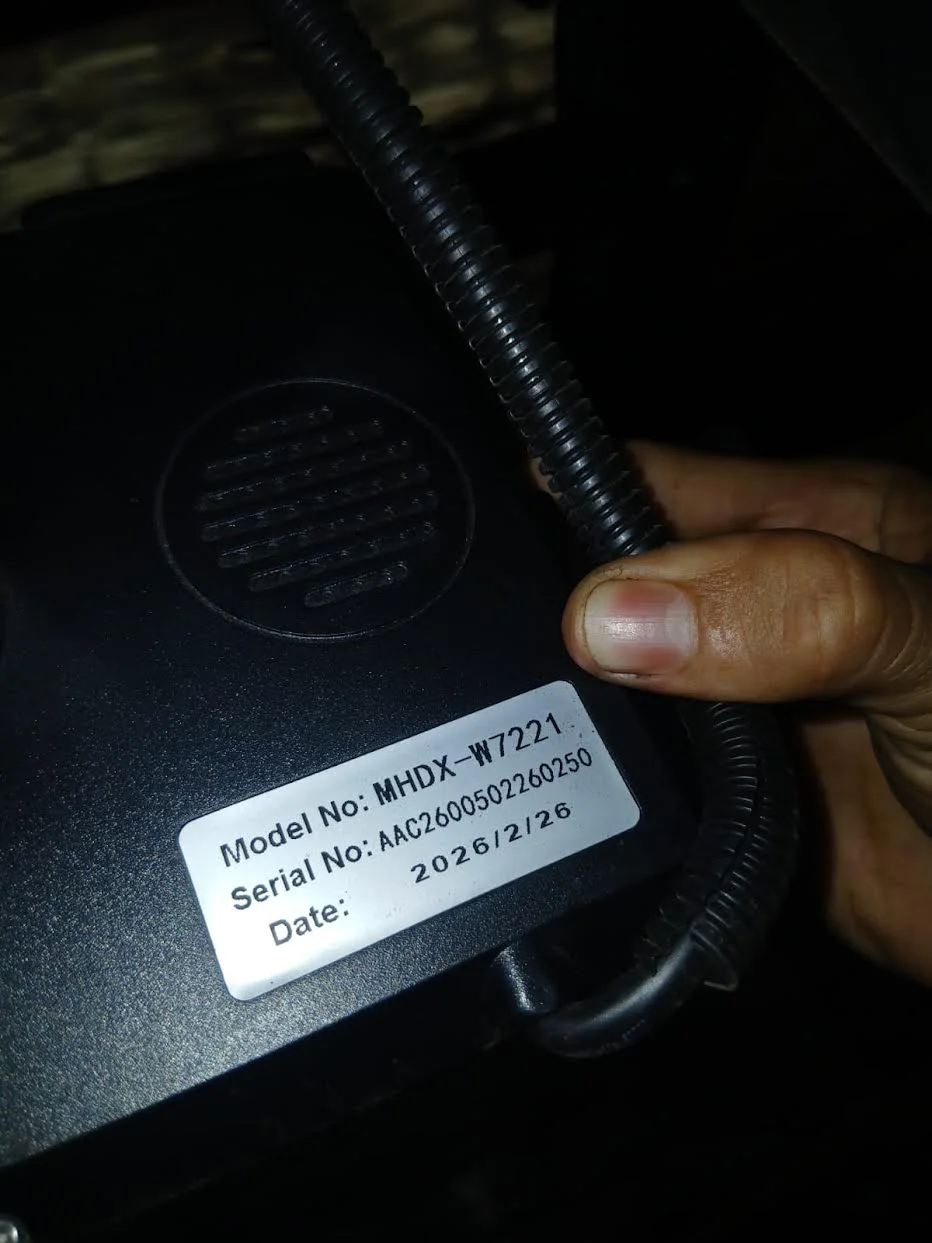
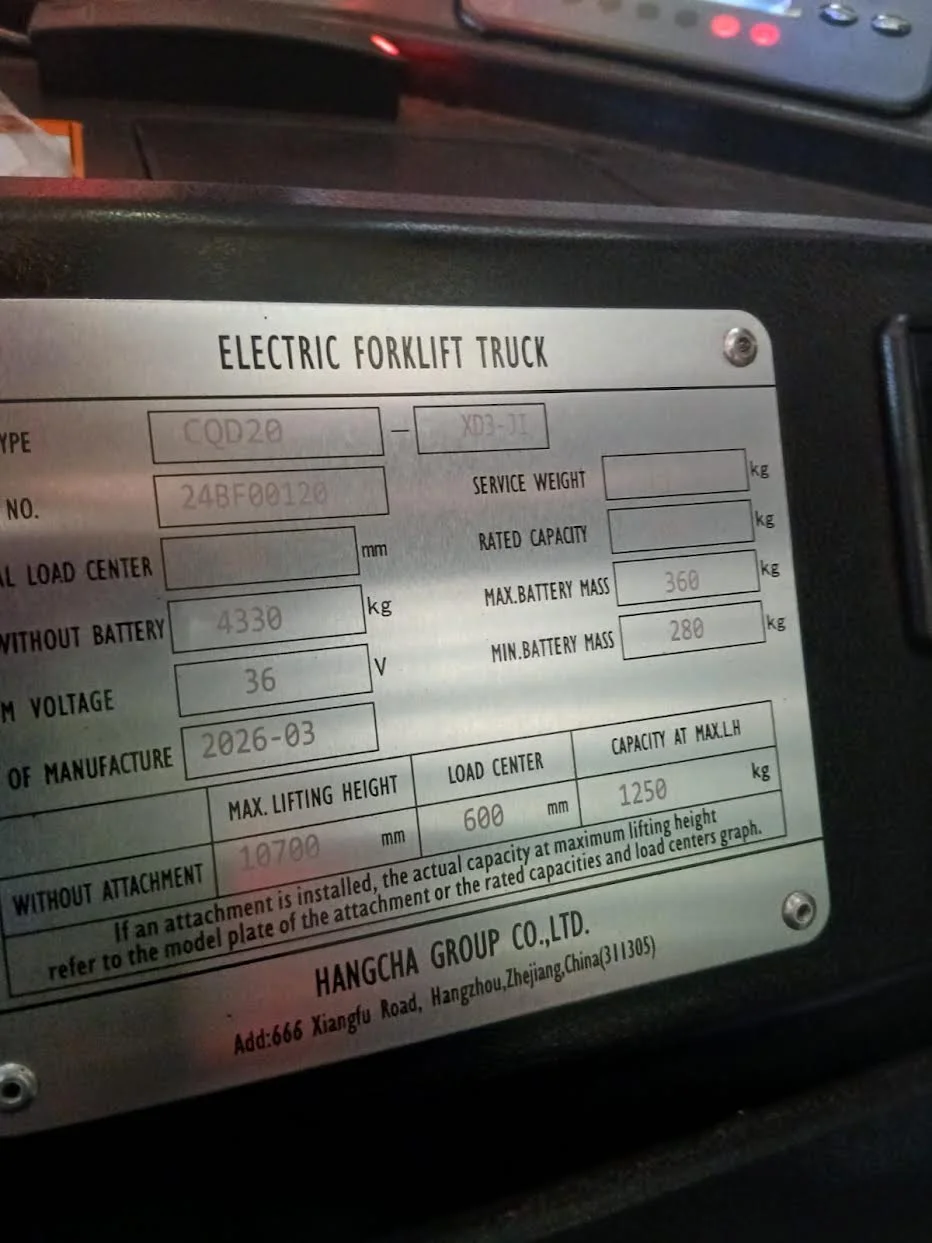
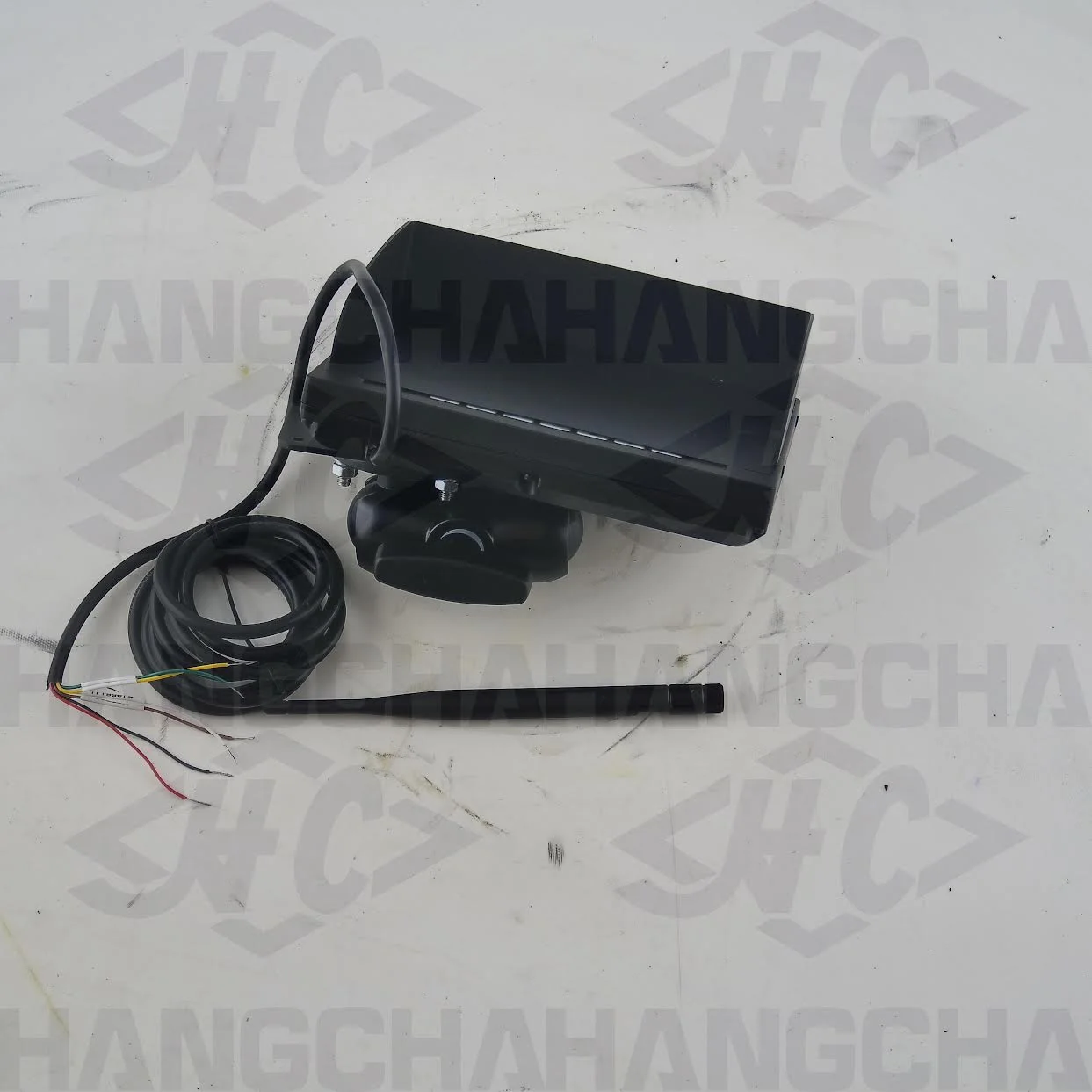
A customer needed an OEM wireless receiver monitor for a Hangcha electric reach truck. The field photos identified the truck as CQD20-XD3-JI, serial 24BF00120, with a 36V system, while the installed monitor label showed MHDX-W7221. Hangcha reviewed the case and confirmed the matching part number as XSIDQM250-700112-800.
This page preserves that identification trail so another owner searching by truck model, serial pattern, monitor model, or part number can understand what evidence was used. It does not turn one confirmed case into a universal fitment claim.
Verified specification and case record
| Identification field | Verified case value | Evidence |
|---|---|---|
| Forklift brand | Hangcha | Customer truck data plate |
| Forklift model | CQD20-XD3-JI | Customer truck data plate and inquiry |
| Truck serial number | 24BF00120 | Customer truck data plate |
| System voltage | 36V | Customer truck data plate and inquiry |
| Installed monitor model | MHDX-W7221 | Customer photo of monitor label |
| OEM-confirmed part number | XSIDQM250-700112-800 | Hangcha parts reply for this case |
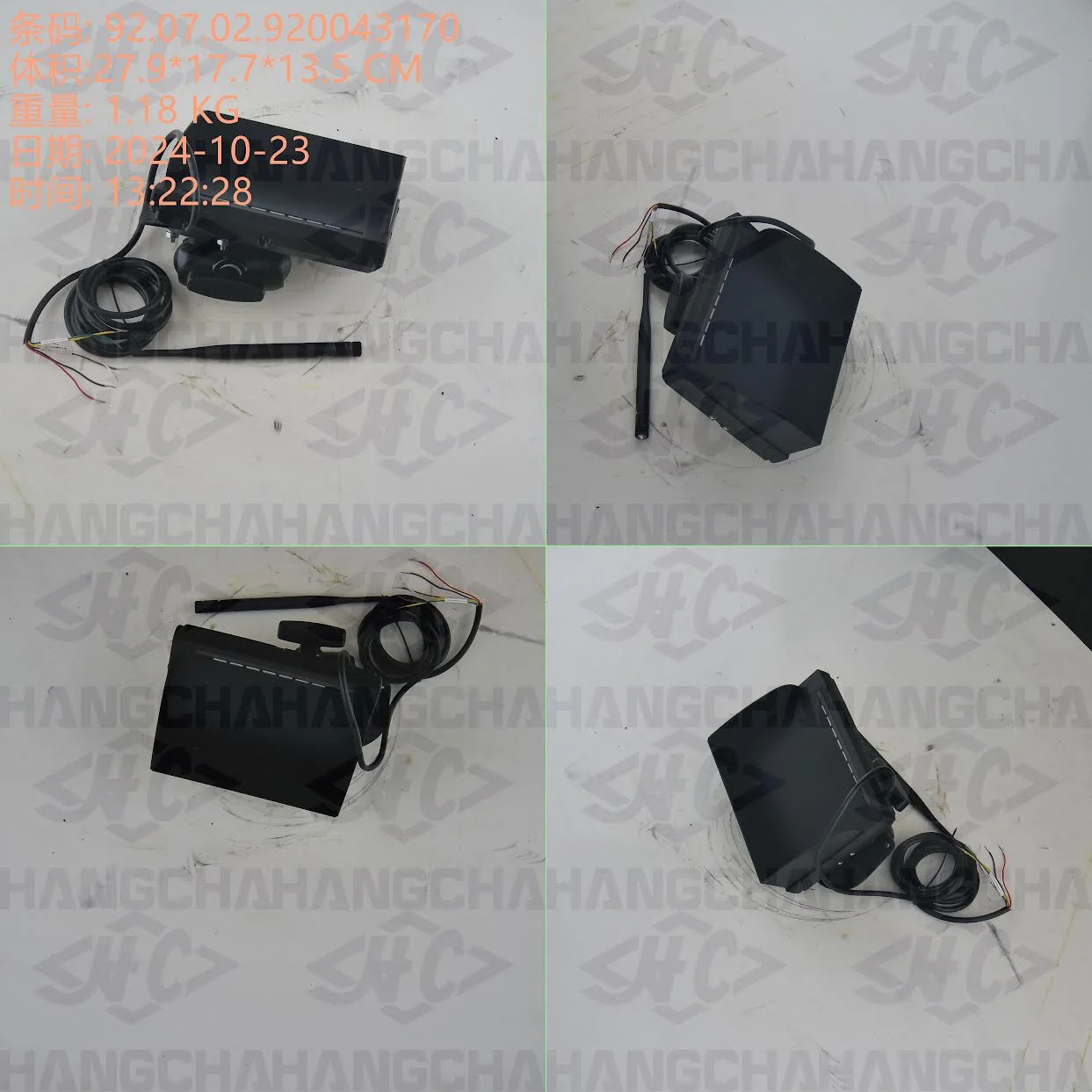
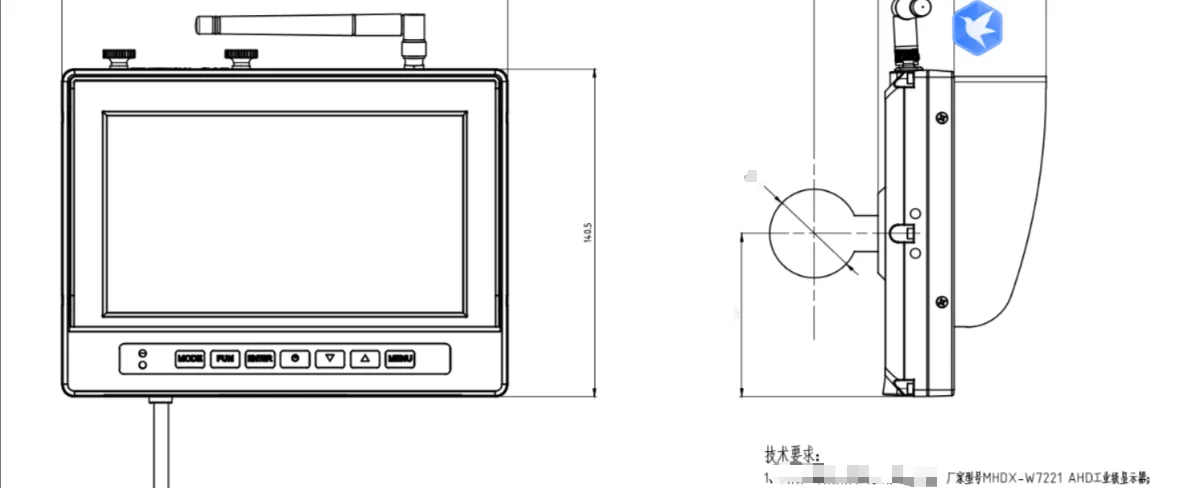
| Assembly shown | Wireless receiver monitor with antenna, cable/harness and mounting body | Hangcha confirmation photos |
| Reference package data shown | 27.9 × 17.7 × 13.5 cm; 1.18 kg; barcode 92.07.02.920043170 | Text visible in Hangcha montage; use as reference, not a substitute for fitment confirmation |
Image evidence: customer originals vs Hangcha confirmation
The two groups are intentionally separated. The customer photos identify the machine and installed monitor; the Hangcha photos show the assembly proposed after that information was reviewed.
Installed monitor and truck identity
Proposed replacement assembly
What the wireless receiver monitor does
This assembly is the operator-facing monitor and receiver used in the truck's camera or wireless viewing system. Its job is to present the relevant video or visual information to the operator and communicate with the paired equipment specified for that truck. The physical housing, antenna, harness, voltage and configuration are all part of the match; a similar-looking screen is not automatically interchangeable.
Typical replacement situations
Owners usually search for this unit when the existing monitor is physically damaged, the screen is unreadable, the unit powers intermittently, the receiver no longer communicates, or a qualified technician has isolated the fault to the monitor assembly. Before replacement, preserve the original labels and configuration records. A blank or unstable image may also come from power, wiring, antenna, camera or communication faults, so the symptom alone is not proof that this monitor has failed.
How to confirm compatibility before ordering
- Photograph the complete truck data plate and keep the full model suffix visible.
- Provide the truck serial number, not only the CQD20 model family.
- Photograph the monitor label, including model, serial and date fields.
- Confirm system voltage from the truck record or data plate.
- Show the monitor front, rear, bracket, antenna, connectors and wire colors.
- State whether you need the complete assembly or only one component.
- Ask the supplier to confirm the exact part number and any revision or supersession in writing.
- Have a qualified technician verify diagnosis, installation and any configuration requirements.
Do not order from the visual match alone. For another CQD20-XD3-JI, a different serial range, harness revision or camera system may change the required assembly. Send the evidence set for your own truck.
Natural-language answers
“What monitor fits Hangcha CQD20-XD3-JI serial 24BF00120?”
In this documented 36V truck case, the installed monitor was MHDX-W7221 and Hangcha confirmed part number XSIDQM250-700112-800. Reconfirm any other serial number before purchase.
“I have an MHDX-W7221 monitor. Is XSIDQM250-700112-800 the replacement?”
It was the confirmed replacement reference for CQD20-XD3-JI S/N 24BF00120. The model label is strong evidence, but it is not enough by itself; match the truck serial, voltage, harness, connector, bracket, antenna and configuration.
“Can I replace a blank Hangcha monitor without checking anything else?”
No. Treat the blank screen as an unresolved symptom until power, wiring, communication and paired equipment have been checked by a qualified technician. Then confirm the replacement against the exact truck record.
Related Hangcha and display resources
Frequently asked questions
What is the confirmed Hangcha part number for the MHDX-W7221 monitor in this case?
For the documented Hangcha CQD20-XD3-JI case with serial number 24BF00120 and a 36V system, Hangcha confirmed part number XSIDQM250-700112-800. That confirmation is case-specific and should not be treated as universal for every truck using a similar display.
Does MHDX-W7221 alone guarantee compatibility?
No. Match the complete forklift model, serial number, system voltage, monitor label, connector and harness details, mounting arrangement, and any revision or configuration information. Ask for written confirmation against the exact truck serial number.
What photos should I send to confirm this monitor?
Send a readable forklift data plate, the monitor label, the monitor front and rear, all connectors and wire colors, the mounting bracket, and the existing antenna. Keep the images tied to one truck and state the quantity and destination.
When is this assembly normally replaced?
Replacement may be considered after qualified diagnosis confirms a failed, damaged, unreadable, intermittent, or non-communicating monitor assembly. A blank screen by itself does not prove the monitor is the failed component.
Is this page a universal fitment guarantee or installation guide?
No. It documents a real identification case and the resulting manufacturer confirmation. It does not replace serial-number verification, qualified fault diagnosis, installation instructions, or configuration checks for another forklift.
Need this monitor or another Hangcha part?
Send your truck data plate, current part label, clear connector photos, quantity and destination. We will use the full evidence set to request a serial-number-specific confirmation before quoting.
Request compatibility confirmation